
From your first idea to a finished object.
Have something you would like to create, but don’t know how to turn it into a printable model?
I offer practical training in 3D modelling and printing, covering the journey from an idea, sketch or photograph to preparing a model, setting up your printer and producing the finished object.
Whether you want to make figures and scenery or design a part with accurate dimensions, I can help you choose a suitable approach and learn the steps.
More ways to bring your ideas to life
You no longer need to learn every aspect of manual modelling before exploring your first creative project.
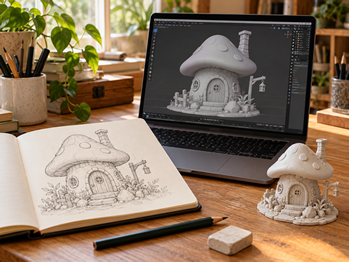
AI tools can help turn descriptions, sketches and photographs into starting models for decorative objects, figures and scenery. That opens up possibilities for people who have ideas but find traditional modelling difficult to get into.
Creating the model is only part of the process. It still needs checking, preparing and slicing before it can become a successful print.
For parts that need precise measurements, working clearances or a particular fit, manual modelling remains important. I teach both approaches, so you can use the method that suits what you want to make.
What would you like to learn?
AI-assisted 3D modelling
Turn a creative idea into a starting model.
Explore how AI tools can help you create models from a written description, sketch or photograph.
This approach is particularly useful for projects such as:
- Figures and character concepts.
- Tabletop scenery and terrain.
- Decorative objects and display pieces.
- Creative shapes to refine and develop further.
I can show you how to prepare your reference material, work through variations and assess whether a generated model is suitable for your intended print.
AI-generated models can need correction and refinement. You’ll learn how to recognise common issues and understand when a different modelling approach would be more effective.
Manual 3D modelling
Create parts with dimensions you control.
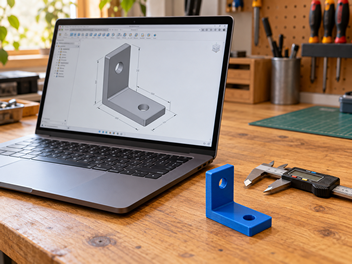
If you want to make a bracket, enclosure, fitted component or another functional object, you need control over its shape and measurements.
Training can cover:
- Turning an idea into a measured design.
- Creating and editing shapes.
- Setting dimensions and checking proportions.
- Designing holes, fittings and clearances.
- Considering wall thickness and print orientation.
- Exporting your design for printing.
- Adjusting the model after testing its fit.
The aim is to help you create models you can revise yourself, rather than relying entirely on downloaded files or generated shapes.
Preparing and printing your model
Take the next step from a digital file to a physical object.
A model can look right on screen and still be difficult to print. Preparation makes a difference.
I can guide you through:
- Checking that a model is suitable for printing.
- Exporting and working with files such as STL.
- Importing your model into slicing software.
- Setting its size and orientation.
- Choosing suitable layer heights and print settings.
- Understanding supports, infill and bed adhesion.
- Preparing your printer and starting a print.
- Recognising common print problems.
- Reviewing the result and making improvements.
We can focus on the areas you need most, whether that’s your first print or a particular problem with your existing workflow.
Learn through your own project
Bring something you actually want to make.
You might have a sketch, a photograph, a downloaded model or an idea you haven’t put on paper yet.
We’ll discuss the result you want and break the process into manageable steps. You can learn how the modelling decisions affect the print, then use what you discover to improve the next version.
Sessions can build on your existing experience and move at a pace that suits you.
Need help creating a model?
If you would prefer help producing a model rather than learning the whole process yourself, tell me what you need.
I can assess the project and discuss whether I can help with modelling, file preparation or a combination of development and training.
For a functional part, useful information includes dimensions, photographs, how it will be used and anything it needs to fit. For a creative object, sketches and reference images can help explain the result you have in mind.
Choosing the right approach
Creative shapes and decorative models
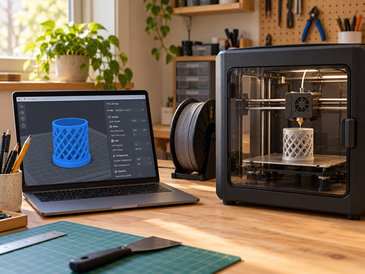
AI-assisted modelling can provide a useful starting point when appearance matters more than exact measurements.
Accurate parts and fitted components
Manual modelling gives you direct control over dimensions and makes it easier to revise the design after a test print.
Existing models that won’t print properly
The work may involve checking the file, changing its orientation, adjusting supports or revisiting the slicing settings.
You don’t need to know which approach you need before getting in touch. We can work that out from your project.
What do you need to get started?
For modelling training, you’ll need a laptop or desktop computer and confidence with everyday tasks such as installing software and managing files.
If you already have a printer, let me know its make and model, the materials you use and any slicing software you have installed.
If you haven’t bought a printer yet, you can still start learning how to create and prepare models. We can discuss what equipment would suit your intended projects before you commit to buying it.
Any paid software, AI services or materials needed for the agreed training will be discussed beforehand.
Practical experience, personal support
I’m Lee Timotheou, the person behind Illuminatek.
I teach 3D modelling and printing through practical projects, helping customers understand the process from creating a model to preparing and producing a print.
My approach combines established modelling techniques with newer AI tools where they are useful, with clear explanations and guidance based on what you want to achieve.
Pricing and getting started
Tell me what you want to make and where you need help.
You might need a focused session on slicing, an introduction to modelling or a series of sessions covering the full process.
For modelling work, I’ll assess the requirements and provide a quote based on the agreed scope.
Before you commit, we’ll agree on the price, what is included and any additional costs for software, services or materials.
Frequently asked questions
Do I need previous modelling experience?
No. Training can start with the basics. If you already have experience, we can focus on the areas you want to develop.
Do I need to own a 3D printer?
No. You can begin with modelling and file preparation before buying a printer or using a printing service. If you want help with your own printer, let me know which model you have.
Can AI make a model from a photograph or sketch?
AI tools can create a starting model from suitable images or descriptions. The result depends on the subject and the tool, and may need editing before it is suitable for printing. It won’t necessarily reproduce exact dimensions or details.
Can you teach me to design accurate parts?
Yes. Manual modelling training can cover measured designs, fitted components and revisions after a test print. The finished fit also depends on the printer, material and print settings.
Can you help with a model I downloaded?
Yes. Tell me about the file, what you want to do with it and any problems you’ve encountered. If you intend to sell prints, you’ll also need to check that the model’s licence permits that use.
Will we finish a print during one session?
That depends on the model and its print time. We can choose a small project where appropriate, or use the session to prepare and start a longer print.
Can you help if my prints keep failing?
I can help investigate common modelling, slicing and setup issues. Describe what happens and include your printer model, material and settings if you have them.
What would you like to make?
Tell me about your idea, what experience you have and whether you’re looking for training or help creating a model.
If you already have a printer or have started a project, include a few details so we can identify a useful starting point.